
iStateBar for Windows · Preview
How much is left?
Glance at the taskbar.
Your Claude Code and Codex limits, plus memory, GPU, CPU and disk, sitting quietly in the corner of the Windows taskbar.
Free · Version 0.1.0Windows 10 / 11 · 64-bit · 173 KB
Claude Code ● OK
Codex PLUS
System
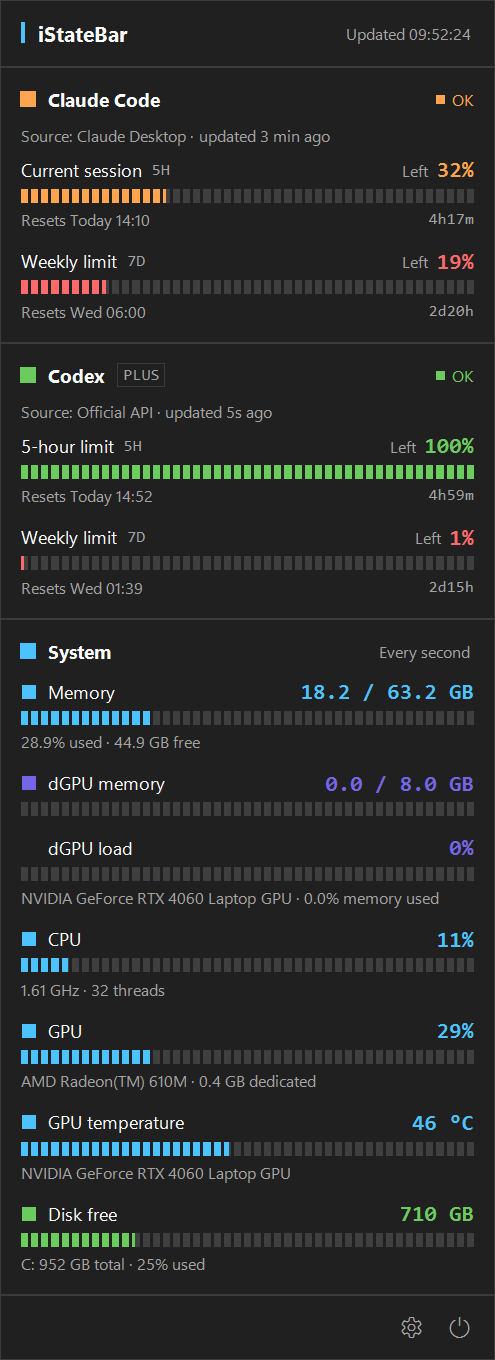
iStateBar for Windows
Two styles. Your choice.
Rounded Windows 11 cards or crisp segmented bars. Both follow your light or dark appearance.
Windows 11
Claude Code ● OK
Codex PLUS
System
Segmented
Claude Code ● OK
Codex PLUS
System
Interface previews · Illustrative readings
Make it yours.
Choose your modules, fonts and colors. Keep the bar in the taskbar, or float it on your desktop.
General
Modules
Appearance
Claude · Codex · CPU · GPU
Just the details you need.
Click a block to open its details. Expand when you want to see everything.
Claude Code ● OK
Interface previews · Illustrative readings
Made for coding with AI.
No more running out
halfway through a task.
Like iStateBar on the Mac, it keeps the numbers you check most where you can always see them.
AI limits
Five-hour and weekly, at a glance.
What is left of your Claude Code and Codex limits, when they reset and how long until then. Turns red below 20%.
Your PC
Memory, GPU, CPU, disk.
Memory, dedicated GPU memory and load, CPU, GPU, temperature and free disk space, read the way Task Manager does, every second.
Click for more
Details right above the block.
Click a block in the taskbar and its details open just above it. Slide to the next block and they follow.
Two looks
Segmented, or Windows 11.
Crisp segmented bars, or rounded cards modelled on Quick Settings. Follows dark and light mode, with a compact size too.
Your layout
In the taskbar, or on the desktop.
Keep it in the taskbar or float it anywhere on the desktop. Drag blocks to reorder them and give each its own colour.
Stays on your PC
Your sign-ins never leave it.
It asks Anthropic and OpenAI for your own quota directly, never through iStateBar's servers. Available in 9 languages.
Three steps.
Download, double-click,
and it's in the taskbar.
Download and unzip
Unzip the download and double-click iStateBarAI.exe. It installs itself in your user folder, so you can delete the ZIP afterwards.
Allow it to run
The preview is not code-signed yet. If you see "Windows protected your PC", click More info, then Run anyway.
Look at the taskbar
The readings appear next to the notification area and start with Windows. Click a block for details; the gear in the panel changes the look, language and colours.
Requires Windows 10 or 11, 64-bit. Quota readings need Claude Code, Claude Desktop or Codex signed in on this PC; the system readings work without them. Hides itself during full-screen games and videos.
Questions
Is iStateBar for Windows free?
The preview is free to download and use, with no account needed.
Why does Windows say it protected my PC?
The preview is not code-signed yet, so Windows warns once about a newly downloaded app. Click More info, then Run anyway.
Where do the quota readings come from?
It uses the sign-ins Claude Code, Claude Desktop and Codex already have on this PC to ask Anthropic and OpenAI for your own quota. Your sign-ins are never sent to iStateBar.
Which versions of Windows are supported?
Windows 10 and Windows 11, 64-bit. Nothing else needs to be installed.
How do I uninstall it?
Turn off Start with Windows in the settings, right-click the strip and choose Exit, then delete the %LOCALAPPDATA%\iStateBarAI folder.
Download iStateBar for Windows
Free preview · Version 0.1.0 · 173 KB
Windows 10 / 11 · 64-bit · not code-signed yet
SHA-256: 718b384e66c3cecc7c3ee834094ac2df1e090c326ee23001e100c36ce7af0391
 Also on the Mac
Your Mac's status,
at a glance.
iStateBar puts AI limits, memory, CPU, GPU, temperatures, fan speed and network in the Mac menu bar. Customise colours and modules, or drag it onto the desktop as a floating bar.
