
Finder Grouping Assistant
Every folder.
Neatly grouped.
Automatically group and sort Finder folders by kind, date or name.
It stays quietly in the menu bar, so folders open already in order.
Free · Version 1.2Signed and notarized by Apple · macOS 13+ · 2.3 MB
A small utility that does one thing.
Finder grouping,
remembered for you.
Finder can already group files, but you have to set it up folder by folder. Finder Grouping Assistant remembers your rules and applies them for you.
Native groups
Uses Finder’s own grouping.
In icon, list and column views it chooses Finder’s built-in Use Groups and sort options, so everything looks exactly like macOS.
Custom rules
Different folders, different order.
Set rules for a folder, its subfolders or an external drive, or exclude places you want left alone.
Stays out of the way
It waits while you work.
It waits at least 2 seconds after you scroll, drag or type, and only touches ordinary Finder windows in front — never text fields, menus or dialogs.
One-click restore
Back to how it was.
The assistant records each folder’s original arrangement. Restore Current Folder brings it back and pauses automatic grouping.
Stays on your Mac
Nothing moved. Nothing uploaded.
It never moves, deletes or renames files. Rules and records stay on this Mac, and you can export a backup.
13 languages
English, Chinese, Japanese and more.
Follows your system language by default, or choose one in Settings. Light and dark appearance are automatic.
Up and running in three steps.
Install. Click.
Folders in order.
Drag to Applications
Open the disk image, drag Finder Grouping Assistant to Applications, then open it.
Choose how to group
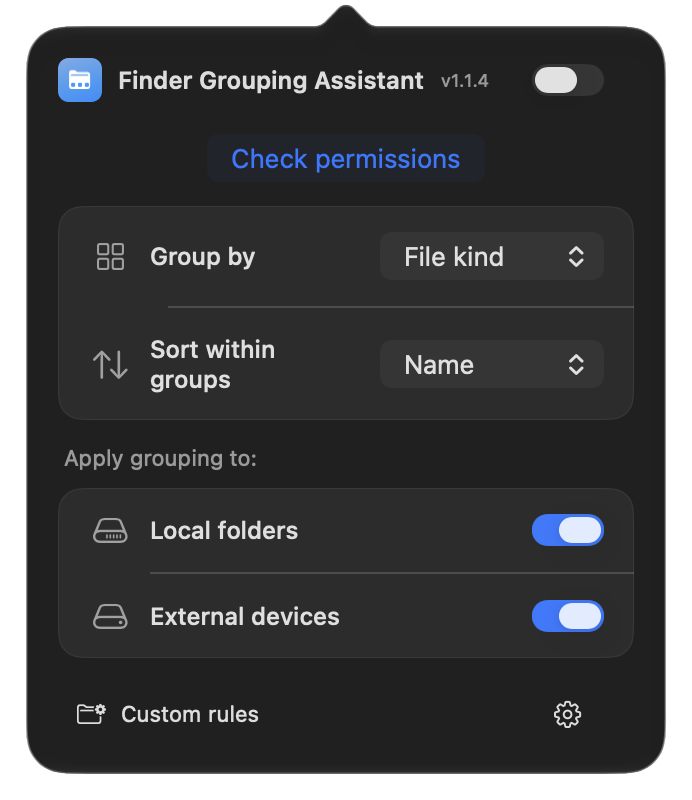
Click the folder icon in the menu bar. Pick Group by, Sort within groups, and whether it applies to local folders or external devices.
Allow and switch on
Turn on the switch next to the title and follow the guide to allow Accessibility and Automation in System Settings.
Requires macOS 13 or later, on Apple silicon or Intel. Gallery view has no Finder grouping, so the assistant only tries to sort there. If macOS hides the menu bar icon, allow it in System Settings → Menu Bar.
Questions and answers
Is Finder Grouping Assistant free?
Yes. It is free to download and use, with no in-app purchases and no account.
Will it move or delete my files?
No. It only changes Finder’s Use Groups and sort options. It never moves, deletes or renames files, and you can restore a folder’s original arrangement at any time.
Why does it need Accessibility and Automation access?
It sets grouping and sorting through Finder’s own View menu, which macOS only allows after you give permission. Without it the app opens, but nothing is applied automatically.
Which Macs are supported?
macOS 13 or later, on both Apple silicon and Intel Macs.
How do I update?
Choose Check for Updates in the settings menu, or let it check daily or weekly. When a new version is available it offers the download, and your rules and settings are kept.
Does gallery view support groups?
Finder’s gallery view has no grouping, so the assistant only tries to sort there. Icon, list and column views all support groups.
Download Finder Grouping Assistant
Free · Version 1.2 · 2.3 MB
Signed and notarized by Apple · macOS 13+ · Apple silicon and Intel
 From the developer of iStateBar
Your Mac’s status,
at a glance.
iStateBar puts memory, CPU, GPU, temperature, fan speed and network in your menu bar. Customize colors and modules, or drag it onto the desktop as a floating bar. Free 7-day trial.
